
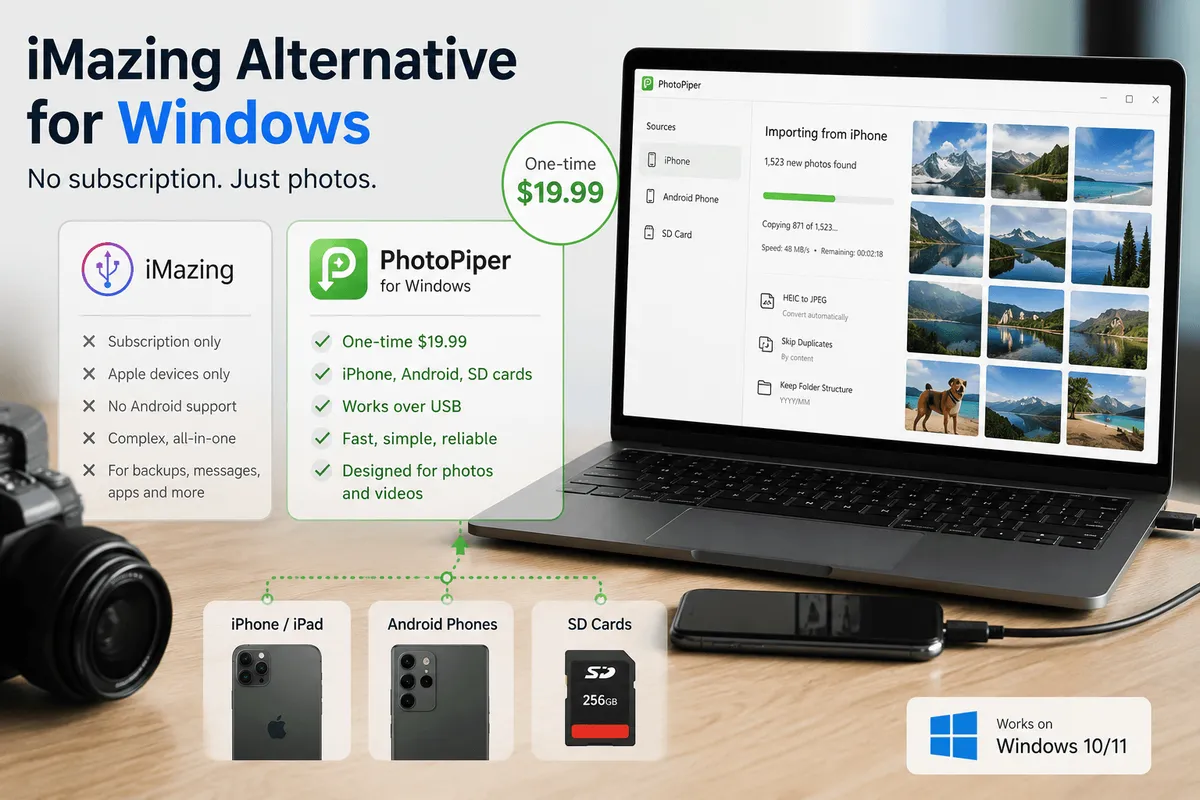
Short answer: if you use iMazing on Windows only to get photos and videos off your iPhone, you’re paying a yearly subscription for a full device-management suite you barely touch. PhotoPiper for Windows does that one job — USB transfer, HEIC→JPEG, duplicate skipping, resume after interruption — for a one-time $19.99, and it reads Android phones and SD cards too, which iMazing doesn’t do at all. If you rely on iMazing for backups, message export, or app management, keep it. Nothing here replaces those.
Why people start looking for an alternative
iMazing has been around since 2008 (as DiskAid), it’s made by DigiDNA in Switzerland, and it runs on both Mac and Windows. It is a genuinely capable tool. The reason searches for “iMazing alternative” keep climbing is not quality — it’s fit and licensing.
Three things drive it:
1. It’s a subscription now. In June 2025 DigiDNA discontinued the perpetual device license and now sells subscriptions only. Renewal is yearly. Stop paying and you stop getting premium features — which, for most home users, is the photo export they bought it for.
2. The scope never matched the need. iMazing manages backups, messages, WhatsApp chats, music, ringtones, books, call history, Safari data, contacts, calendars, app data, the iOS file system, device supervision and more. If you need three of those, it’s excellent value. If you open it four times a year to empty your camera roll before a trip, you’re renting a workshop to hang one picture.
3. It only speaks Apple. iMazing is an Apple device manager, full stop — iPhone, iPad, iPod, Apple TV, Apple Vision Pro. There is no Android support and never has been. On a Mac that’s rarely a problem. On a Windows PC it often is, and that’s the next section.
That’s the whole decision, and it’s worth being honest about it in both directions.
When you should keep iMazing
Don’t switch if any of these describe you:
- You take full device backups to your PC and restore from them.
- You export iMessages, SMS, or WhatsApp chats — for records, for court, for keeping.
- You manage apps, ringtones, books, or the iOS file system from the computer.
- You use it for work: provisioning, configuration profiles, CLI, e-discovery.
- You run it across many devices — a family with several iPhones and iPads is exactly who the subscription tiers are priced for.
PhotoPiper does none of that and isn’t trying to. It reads photos and videos off a connected device and writes them into a folder you choose. That’s the entire product.
The Windows problem iMazing can’t solve: not everything in the house is an iPhone
This matters more on Windows than on macOS, and it’s the reason a lot of PC users end up with two or three transfer tools installed.
A Mac household is usually all-Apple. A Windows household usually isn’t. One person shoots on an iPhone, someone else has a Pixel or a Galaxy, and there’s a mirrorless camera or a dashcam with an SD card in a drawer. All of it needs to end up in the same photo folder on the same PC.
iMazing covers exactly one of those sources. For the Android phone you fall back to File Explorer and MTP — the “Calculating…” pause, the copy that dies at file 6,000 with Device has stopped responding, no resume, and the manual duplicate cleanup afterwards. For the SD card you’re dragging folders by hand.
PhotoPiper reads all three from one app:
- iPhone and iPad over USB — camera roll, HEIC converted to JPEG as it copies.
- Android phones over USB — photos and videos straight from the DCIM folder. Nothing installed on the phone, no Wi-Fi pairing, no ADB, no developer options.
- SD cards and card readers — insert the card from a camera and import every shot in one pass.
Same destination folder, same YYYY/MM date structure, same duplicate rules, same resume behaviour. One workflow instead of three.
One honest limit on Android: PhotoPiper reads DCIM, which is the camera roll. Screenshots usually sit in Pictures/Screenshots and WhatsApp media under Android/media/, both outside DCIM — grab those in File Explorer, they’re small. On iPhone this doesn’t come up, because everything lives in DCIM.
When PhotoPiper is the better fit
Switch if your actual usage is closer to this:
- You want photos and videos in a normal Windows folder — not in an app’s library, not in the cloud.
- You have more than just iPhones in the house and don’t want a separate tool per device.
- Your camera roll is large, and the built-in Windows import stalls or dies partway through.
- Your photos arrive as HEIC and won’t open on the PC.
- You want to run it again next month and copy only what’s new.
- You’d rather pay once than renew every year for a feature set you don’t use.
Side by side
| iMazing | PhotoPiper for Windows | |
|---|---|---|
| What it is | Full iOS device manager | Photo & video transfer only |
| Pricing model | Yearly subscription (device slots) | One-time $19.99, no subscription |
| Trial | No time limit; premium features locked | 5 days, up to 100 photos/day, all features |
| Sources | Apple devices only — iPhone, iPad, iPod, Apple TV, Vision Pro | iPhone, iPad, Android phones, SD cards |
| Android support | None | USB, straight from DCIM |
| Backups / messages / apps | Yes | No |
| HEIC → JPEG during transfer | — | Yes, on the fly |
| Duplicate handling | — | Compares by name and content, skips repeats |
| Interrupted transfer | — | Resumes; already-copied files are skipped |
| Windows on ARM | — | Native ARM64 build, no emulation |
| Platforms | Mac and Windows | Mac and Windows (separate apps) |
The dashes aren’t jabs — they’re scope. iMazing solves a much wider problem, which is precisely why it costs what it costs.
What the switch actually looks like
Four steps, about ten minutes:
- Install PhotoPiper. Get it from the Microsoft Store (sandboxed, auto-updating, no SmartScreen prompt), or download the signed installer directly — x64 for Intel and AMD, ARM64 for Snapdragon and other Windows-on-ARM PCs. No iTunes, no Apple drivers, no account.
- Plug the phone in over USB. On iPhone, tap Trust if it asks. On Android, pull down the notification shade and switch the USB mode from Charging to File transfer — that one step is the reason most PCs “don’t see” an Android phone. PhotoPiper then scans the camera roll and shows the item count and total size before a single file moves.
- Set three things: the destination folder (any drive, including external),
YYYY/MMdate folders or flat, and HEIC→JPEG on. Leave duplicate skipping enabled. - Run it. Copied, skipped, and failed appear as live numbers. If the cable moves or Windows reboots, start it again — it picks up where it stopped instead of re-copying everything.
The 5-day trial moves up to 100 photos a day. That’s enough to point it at your own library, on your own PC, and see whether it behaves before you pay anything.
On a Mac instead?
iMazing runs on macOS too, and so does PhotoPiper — PhotoPiper for Mac is a separate native app on the Mac App Store for transferring from iPhone and iPad over USB.
Same idea, same shape: photos land in a Finder folder you pick, including an external drive — not inside the Photos library, and not through iCloud. Every file is validated with a checksum and logged, so you can confirm what was saved and what was skipped. HEIC→JPEG conversion, YYYY/MM folders, duplicate detection, and resumable transfers all work the same way as on Windows.
The Mac version is free to download with every feature included — the only limit on the free tier is how many photos you can move per day, and the quota resets at midnight UTC. An optional one-time in-app purchase removes that limit for good. No subscription, and no analytics, tracking, or telemetry: the app runs entirely on your Mac.
One difference worth flagging: the Mac app is built around iPhone and iPad. The multi-source story — Android and SD cards in the same app — is a Windows thing, because that’s where mixed households actually are.
If you’re on both platforms, try both — they’re separate apps and separate purchases, but each one is a purchase, not a renewal.
Honest limits
Four things worth knowing before you download:
- It doesn’t touch backups, messages, or apps. If you leave iMazing, you leave those behind. Some people keep both — iMazing on a device license they already own, PhotoPiper for the monthly camera-roll dump.
- It reads the DCIM folder. That’s the whole camera roll on iPhone. On Android it misses screenshots and WhatsApp media, as covered above.
- It’s one-directional. Device → PC. It doesn’t push files back onto the phone.
- It’s cable-based. No app on the phone, no Wi-Fi pairing, no dropped connection halfway through 8,000 photos — but you do need the cable.
FAQ
Is there a free iMazing alternative for Windows? File Explorer and the Windows Photos app are free and handle a few hundred photos fine. Both run on MTP, which struggles on large libraries: long “Calculating…” pauses, no resume after a failure, and re-copying files you already have. Free works until the library gets big.
Does iMazing work with Android phones? No. iMazing manages Apple devices only — iPhone, iPad, iPod, Apple TV and Apple Vision Pro. If you have an Android phone on the same PC, you need a second tool for it.
Can PhotoPiper import from an Android phone? Yes. Connect it over USB, set the phone’s USB mode to File transfer, and PhotoPiper imports photos and videos from the DCIM folder — the same workflow it uses for iPhone. Nothing is installed on the phone and there’s no Wi-Fi pairing.
What about photos from a camera SD card? Insert the card or a card reader and PhotoPiper imports every shot in one pass, into the same folder structure as your phone photos.
Does PhotoPiper require iTunes or Apple Mobile Device Support? No. It copies photos straight from the iPhone over USB — no iTunes, no Apple drivers, no sign-in.
Is it a subscription? No. One-time $19.99 on Windows, with local taxes possibly added at checkout. The Mac version is a free download with an optional one-time unlock.
Will it convert HEIC photos so they open on Windows? Yes. Turn on HEIC→JPEG and each photo is converted as it transfers, so it opens in any Windows app without installing a paid codec.
Can I use it alongside iMazing? Yes. They don’t conflict. Plenty of people keep a device manager for backups and use a dedicated tool for the camera roll.
Does it work on Windows on ARM? Yes — there’s a native ARM64 build alongside x64, so it runs without emulation on Snapdragon and similar devices.
What happens if the transfer is interrupted? Run it again. PhotoPiper tracks what it already copied, skips those files, and continues with the rest. No restarting from zero, no duplicate cleanup afterwards.
Moving a large iPhone library for the first time? Start with How to Transfer Photos from iPhone to Windows Without iCloud. On Android? See How to Transfer Photos from Android to PC.
Try PhotoPiper for Windows — 5-day trial, up to 100 photos a day. One-time $19.99, no subscription. Try PhotoPiper for Mac — free download, optional one-time unlock.